
How to Reschedule a Project Timeline Without Breaking Dependencies
Move one task on its own, or hold Shift to move its downstream tasks and linked milestones by the same offset.
Choose what the drag should move
An ordinary drag moves the selected task only. Hold Shift while dragging when the same delay or acceleration should move the task and everything connected downstream.
The Shift-drag gesture applies one date offset to the full downstream chain. A three-day move adds three days to every reached task and linked milestone. It preserves spacing; it does not recalculate dates from Finish-to-Start, Start-to-Start, Finish-to-Finish, or Start-to-Finish rules.
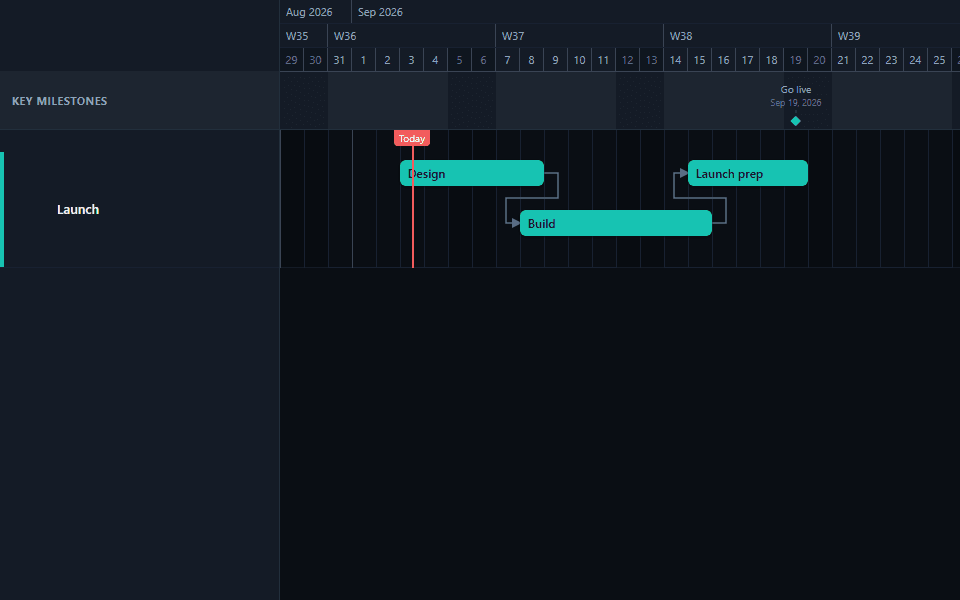
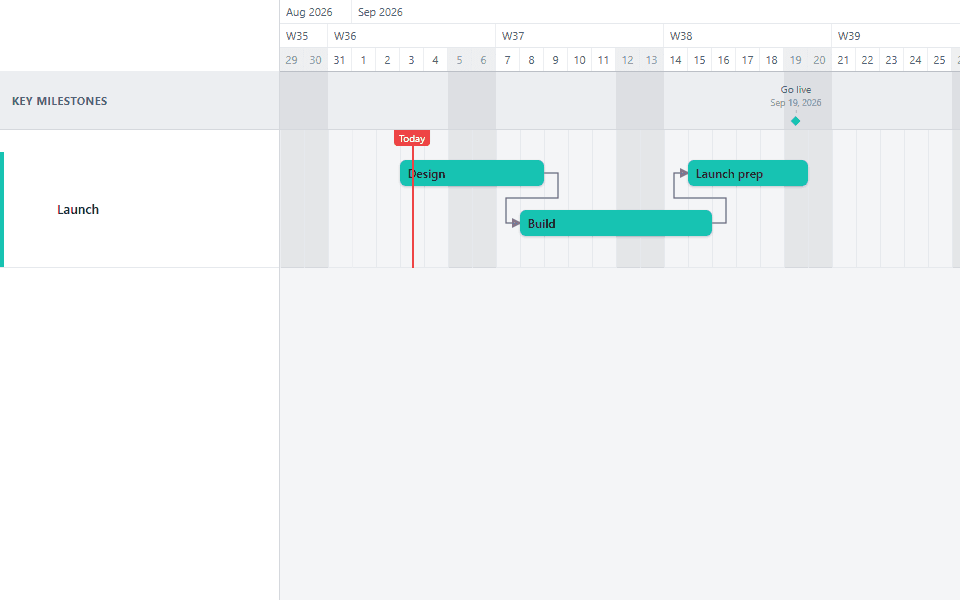
Choose a normal drag or Shift-drag
Drag normally when only this task should move. Hold Shift when the same date change should reach every task and milestone linked after it.
Hold Shift and drag the task bar
Move the task to its new date while keeping Shift held. The selected task and all downstream items move by the same number of days.
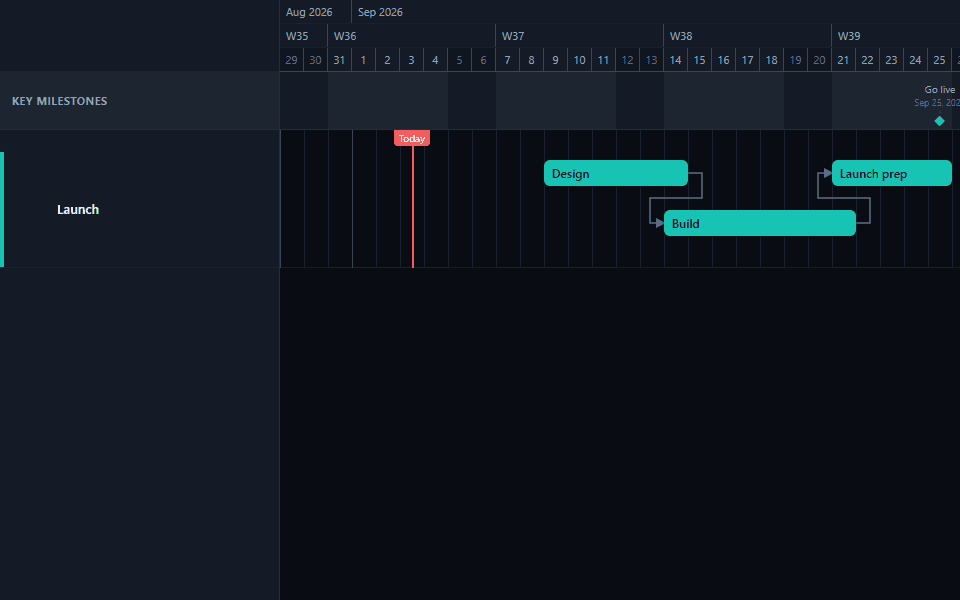
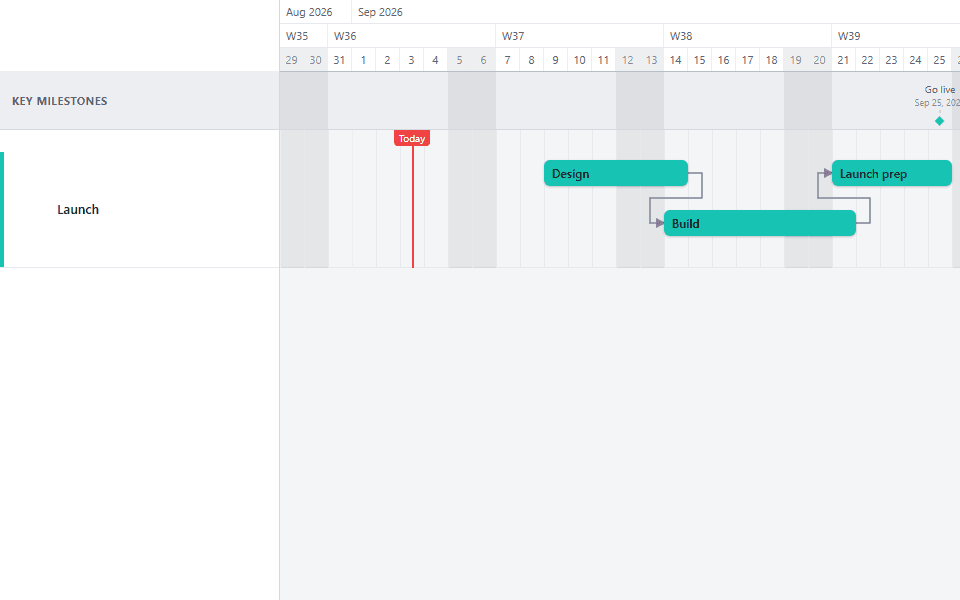
Review the moved dates
Check every downstream bar and milestone after releasing the drag. GanttFlow shifts linked items by a fixed offset. It does not enforce a dependency rule or calculate a critical path.
Why a normal drag is not enough on a linked chart
The moment two tasks are connected by a dependency, moving one of them by hand creates a second problem: everything downstream is now wrong, and nobody has updated it yet.
On a small chart this is a few clicks of manual correction. On a real project (a 30-task delivery plan, a construction schedule with parallel trades, a CRM implementation with a dozen linked milestones), it is the difference between a five-second fix and twenty minutes of re-dragging bars one at a time while trying to hold the whole dependency graph in your head. Shift-drag exists to remove that second problem entirely: one gesture, one offset, applied everywhere it needs to go.
What actually moves, and what does not
Shift-drag reaches every task and milestone connected to the dragged task through an outgoing dependency link, followed recursively. If Task A links to Task B, and Task B links to Milestone C, dragging Task A with Shift held moves B and C as well, by the same number of days.
Three things do not move:
Anything upstream of the dragged task. The cascade only travels forward through the dependency graph. A predecessor never moves because a successor did.
Anything not linked at all. A task or milestone sitting nearby on the same lane, with no dependency arrow connecting it to the dragged item, is invisible to Shift-drag. It stays exactly where it was.
A milestone deliberately left unlinked. This is a common and correct pattern for a genuinely fixed external date: a signed contract deadline, a conference date, a regulatory filing window. Leave that milestone without an incoming link, and no amount of upstream rescheduling will touch it.
Reading the result correctly
Every downstream bar moved by the same number of days. A three-day Shift-drag adds three days to a two-day task and to a six-week task alike. It is an offset, not a proportional stretch. If a downstream task actually needs a different amount of buffer once the upstream work shifts, that is a judgment call for you to make with a follow-up drag, not something the cascade infers.
A milestone stayed put. Only milestones linked downstream move. This is correct for an unlinked external deadline and a sign of a missing link for a milestone produced by the work.
The dependency type on each link did not change how far things moved. A Finish-to-Start link and a Start-to-Start link both shift by the same fixed offset under Shift-drag. The type still governs which date GanttFlow displays as connected on the arrow; it does not change the arithmetic of the cascade itself.
When to use a normal drag instead
Not every date change should cascade. Reach for a plain drag, without Shift, when:
- Only one task actually moved. A single task ran long or finished early, and nothing downstream needs to change because there was slack absorbing the difference.
- You are correcting a mistake on one bar. If a task was entered with the wrong date and everything else was already correct, dragging it back with Shift held would incorrectly drag correct work along with it.
- You want to see the conflict before deciding how to resolve it. Sometimes the useful information is exactly that a task now overlaps or clashes with its neighbor. Moving only that task surfaces the problem instead of quietly absorbing it into a cascade.
Common mistakes
Forgetting to hold Shift, then wondering why downstream work looks stale. The most frequent version of this mistake: a task moves two weeks, the presentation goes out, and three linked tasks still show their old dates because the drag was never held with Shift. Get in the habit of pausing before every date change on a linked chart and deciding, out loud if it helps, whether this one should cascade.
Assuming Shift-drag will stop at a "sensible" boundary. It does not know what a phase gate or a sprint boundary is. If every task in your plan through the end of the project is chained together by dependencies, a Shift-drag on the first task can move the entire remaining plan. Check your dependency structure before you rely on the cascade stopping somewhere convenient.
Not checking for downstream milestones before presenting. A milestone with no visible date change after a reschedule is easy to miss in a busy chart, especially in a client-facing view. Scan every milestone connected to the moved work before sending the export, not just the task bars.
Re-doing a cascade instead of undoing it. If a Shift-drag reached further than intended, undo it with Ctrl+Z and re-check the dependency chain, rather than trying to manually drag everything back to where it was. Manual correction after an over-wide cascade is exactly the tedious work this feature exists to avoid.
Shift-drag and baselines together
If any of the downstream tasks or milestones have a baseline set, a Shift-drag will immediately produce variance on every one of them, even though nobody edited them individually. That is expected: a baseline compares a task's current planned dates against a saved snapshot, and Shift-drag genuinely changed the current planned dates. When presenting the result, frame it as one upstream task moving and the linked work inheriting the same change, rather than several unrelated things slipping at once.
Where this shows up on a real plan
See shift-drag cascading through a real dependency chain in the Dynamics 365 Implementation template or the CRM Implementation template: both chain dozens of links across parallel workstreams, so a single upstream delay visibly reaches milestones several stages downstream. The Construction Schedule template and Migration Roadmap template are also heavily linked, since sequencing dependent trades and sequencing a cutover are exactly the kind of work this gesture is built for.
Common questions
- Does Shift-drag recalculate dates, or just shift them?
- It shifts them. Every reached task and milestone moves by the exact same number of days as the task you dragged, regardless of its own duration or dependency type. It does not read the Finish-to-Start, Start-to-Start, Finish-to-Finish, or Start-to-Finish rule on each link and recompute a date from it. Think of it as translating a whole downstream cluster along the calendar, not re-scheduling it from first principles.
- Why did a milestone stay put when I expected it to move?
- Only milestones reachable through an outgoing dependency link from the dragged task move. An unlinked milestone, or one connected only to a task upstream of the one you moved, stays where it is. That is usually correct for a genuinely fixed external date, like a signed contract deadline or a conference slot. If a milestone should have moved and did not, check whether the link exists at all before assuming the feature is broken.
- Can I undo a Shift-drag that moved more than I intended?
- Yes. Ctrl+Z (Cmd+Z on Mac) undoes the entire cascade as one action, the same as it would undo a normal single-task drag. GanttFlow does not require you to undo each downstream item separately. If the result looks wrong, undo immediately and re-check which tasks are actually linked before dragging again.
- What happens if I Shift-drag a task that has no downstream dependencies?
- Nothing different from a normal drag. Shift-drag only has an effect where a dependency chain exists to cascade through. Holding Shift on an isolated task, or the last task in a chain, moves that task alone.
- Does GanttFlow warn me before a Shift-drag moves a lot of downstream work?
- No. There is no confirmation step and no preview of the affected range before you release the drag. Review the result immediately after releasing, and undo if the cascade reached further than you expected. This is a deliberate trade-off for a fast, direct-manipulation editor rather than a modal workflow.