
Data Migration Gantt Chart Template
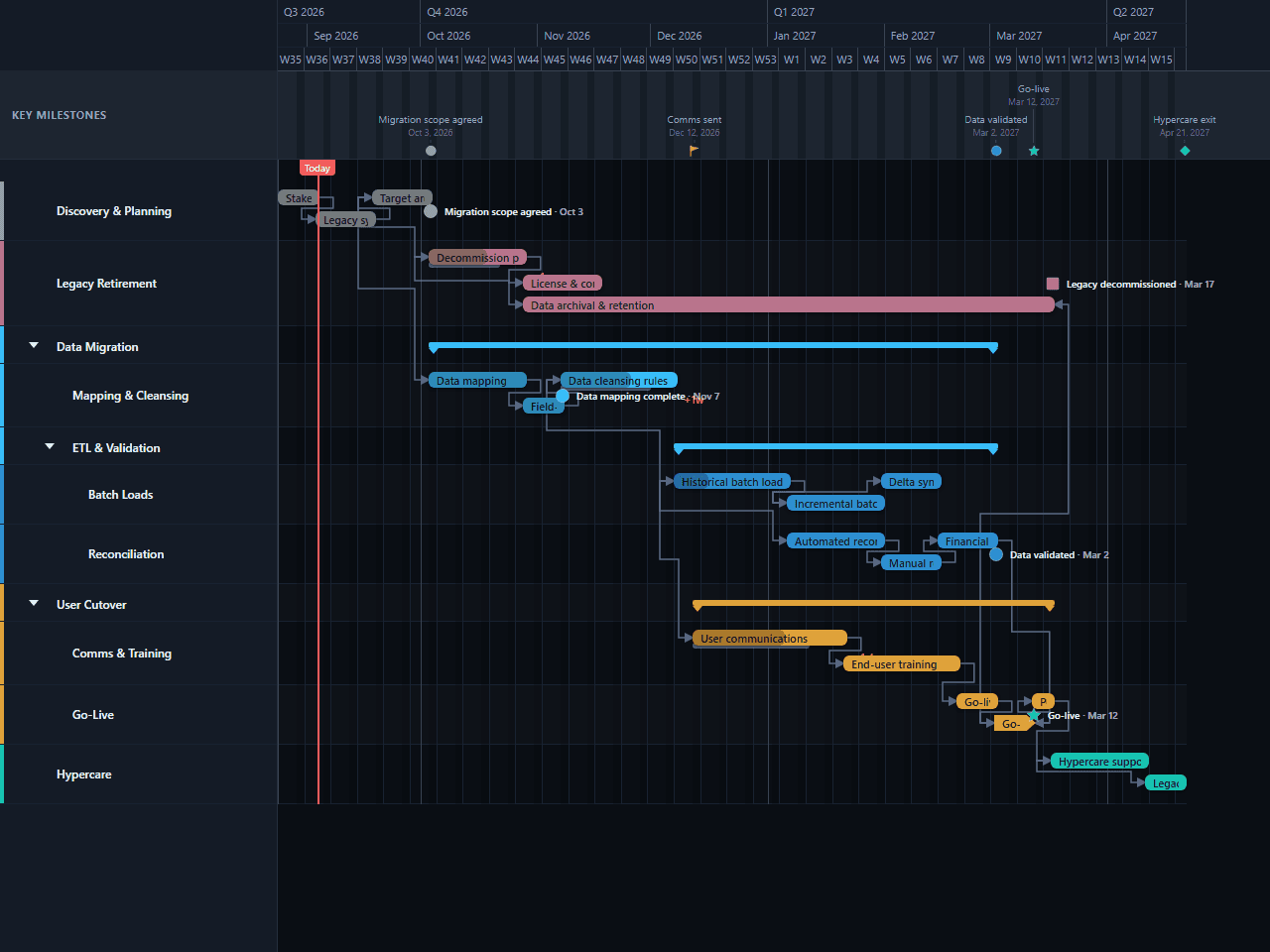
A migration plan running legacy-system retirement, a three-deep data migration track — mapping, then ETL split into batch loads and reconciliation — and a user cutover track split into communications and the go-live window itself, all converging on hypercare. The dependency chain leans on start-to-start links, the shape a real cutover actually takes, plus a start-to-finish gate on legacy archival and a finish-to-finish link tying financial reconciliation to the go-live window closing. Useful for a systems or data migration lead who needs to show several workstreams converging on one cutover, not a single "migrate" bar.
- Discovery & Planning
- Legacy Retirement
- Data Migration
- User Cutover
- Hypercare
Download the plan free as a CSV: phases, tasks, dates, and dependencies, ready to open in Excel, Google Sheets, or Numbers. Open it in GanttFlow instead and it drops in as a fully editable, presentation-ready Gantt chart (Pro).
Migrations are judged entirely on the last week. Months of careful mapping count for nothing if users arrive on Monday to find their records missing, and the plan that prevents that is one where data readiness and people readiness are tracked as separate, equally serious workstreams, nested deep enough to show the real choreography. This template is arranged that way.
Who this migration roadmap template is for
This is for whoever owns a system replacement, an IT programme manager, a solution architect, an operations lead. It assumes you're moving off a system that holds real historical data, that users depend on it daily, and that the old system has to be switched off rather than left running.
That last assumption is what distinguishes a migration plan from an implementation plan. If nothing is being retired, you're implementing, and the executive roadmap template is a better fit.
What are the phases of a migration plan?
Five top-level lanes: one of them nested three deep, another split into two.
Discovery & Planning covers stakeholder workshops, a legacy system audit, and target architecture design.
Legacy Retirement covers the decommission plan, license and contract wind-down, and data archival & retention. The first two close out before cutover; archival runs for the length of the whole project, since retention obligations don't end just because the system has been switched off.
Data Migration splits into Mapping & Cleansing (data mapping, field-level validation, cleansing rules) and ETL & Validation. ETL & Validation itself splits into Batch Loads (historical, then incremental, then delta sync) and Reconciliation (automated checks, manual review, then financial close reconciliation).
User Cutover splits into Comms & Training and Go-Live: the go-live window itself and post-go-live smoke tests.
Hypercare covers hypercare support in the final weeks of the schedule.
Two milestones: data mapping complete, midway through the mapping and cleansing work, and comms sent, once user communications begin.
How long does each migration phase take?
A little over five months in total. Discovery & Planning runs about two weeks. Legacy Retirement is the longest single lane at twenty weeks, but that's because data archival & retention runs across nearly the whole project rather than as a discrete late-stage task; decommission planning and licence wind-down, the two tasks that actually gate cutover, close out in about six weeks. Data Migration spans roughly fifteen weeks across mapping, batch loads, and reconciliation together. User Cutover runs about thirteen weeks, and Hypercare closes the programme in the final three and a half weeks.
One figure deserves scrutiny when you adapt this. Reconciliation (automated checks, manual review, and financial close reconciliation) runs almost eight weeks, and it's sequenced so each stage only starts once the batch loads feeding it have landed. Compressing this into "a final check" is the single easiest way to understate a migration's real timeline, since matching data back to source is where discrepancies actually surface, not before.
Which dependencies matter in a migration?
Four links, and this template deliberately doesn't over-link. Most of the schedule's real sequencing comes from fixed dates set directly against the business calendar rather than from chained dependencies, a smaller, more honest set of drawn arrows than a fully-linked chain would suggest.
Three are finish-to-start: the decommission plan finishes before licence and contract wind-down starts, so retirement admin doesn't begin until there's an agreed plan to retire against. User communications finish before end-user training starts, so people hear about the migration before they're trained on the replacement. Post go-live smoke tests finish before hypercare support starts, so the team isn't running both at once.
One is start-to-start: target architecture design and the decommission plan begin together. Planning what the new system looks like and planning how the old one gets retired start from the same trigger, rather than queuing retirement planning behind the architecture work finishing.
Everything else (the batch-load sequence, reconciliation, comms timing relative to the first batch load, and data archival's long span across the whole project) is expressed through each task's own start and end dates rather than a drawn link. That's a legitimate way to model a schedule: a dependency arrow is for a relationship that should hold even if dates move, and not every real-world sequencing choice needs one drawn to be visible on the chart.
What to change for your own migration
Profile the source data before trusting the mapping bars
Everything downstream depends on it. If nobody has yet counted how many records fail validation, the cleansing bar is a guess, and it's the guess most likely to be wrong by a factor of two.
Fix the go-live date against the business calendar
Cutover windows collide with month-end, quarter-end, and peak trading. Place go-live where the business can absorb it, then work backwards through the chain.
Split training if user groups differ
One training bar is a simplification. Finance users and warehouse users need different sessions on different dates, and each is a bar someone owns.
Add a rollback decision milestone
Immediately before the go-live window. It's the point at which you commit, and making it a visible date turns an implicit decision into an explicit one.
Baseline once the scope milestone is agreed
Migration scope creep is the norm rather than the exception, and a baseline is the only way to show a steering group how much of a delay is scope rather than execution.
Common mistakes on migration timelines
Cleansing treated as a preliminary. It's the longest and least predictable task in the project and it deserves its own bars, not a single placeholder.
Communications starting after the data work. By then people have heard rumours and formed opinions, and you're correcting rather than informing.
Archival shown as a short task at the end. Retention obligations don't end when the old system goes dark, and modelling archival as a brief closeout task understates how long the organisation is actually on the hook for the legacy data.
A one-day cutover. The go-live window and the smoke tests that follow it don't fit in a day, and compressing them on the chart doesn't compress them in reality.
Training scheduled too early. Training people weeks before go-live means retraining them. This template ends training just three days before the go-live window opens, which keeps what users learned fresh instead of stale.
Sharing the migration plan
Migration plans are read by more people than almost any other project chart: users, support teams, the vendor, the steering group. Export a PDF for the formal pack and a PNG for the weekly update, and re-export as the bars move. Nobody needs an account to open it, which matters when the audience includes an entire user base rather than a project team.
Questions about this template
- How long does a system migration take?
- This template spans a little over five months from architecture design to hypercare exit, nested three deep under Data Migration and split into communications and go-live under User Cutover. The elapsed time is driven less by engineering than by data quality and user readiness: Reconciliation alone runs nearly eight weeks once financial close is counted, and Legacy Retirement's archival work (data archival & retention) runs in the background for the length of the whole project rather than as a short task at the end.
- What is the most commonly underestimated part of a migration?
- Reconciliation. Teams plan the extract-transform-load work and treat matching the migrated data back to source as a formality, when in practice it's where mismatches actually surface. This template gives automated checks, manual review, and financial close reconciliation a combined eight weeks, run in sequence after the batch loads that feed them, and that's before any issues found in review get fixed and re-checked.
- When should users be told about a migration?
- Earlier than feels comfortable. This template starts user communications about five days after the historical batch load begins, not once every batch has loaded, and runs communications for six weeks before end-user training starts. Migrations that announce themselves a fortnight before cutover generate resistance that no amount of training can undo.
- When does this template retire the legacy system?
- Data archival & retention is scheduled to run for the length of the whole project, not as a short task at the end: it starts alongside the very first discovery work and doesn't close until after hypercare. That reflects how long-tail retention obligations actually behave: archival isn't something you finish and check off, it's a responsibility that outlives go-live. Decommission planning and licence wind-down are the two tasks that actually close out before cutover.
- How do I show a cutover window on a Gantt chart?
- As a short bar at the end with a milestone marking when communications go out, which is how this template does it: a go-live window of about a week and a half, followed by post-go-live smoke tests before hypercare starts. A cutover has real duration because smoke testing and early support sit right after it, so a single-day marker understates it.
- Can I run a phased migration with this template?
- Yes, and for large user bases you probably should. Duplicate the User Cutover lane once per wave, stagger each wave's training and go-live window by a few weeks, and keep one shared Data Migration lane feeding all of them. Extend the data archival & retention task to cover whichever wave retires the legacy system last, since that's the wave that actually determines when the old system can be switched off.