
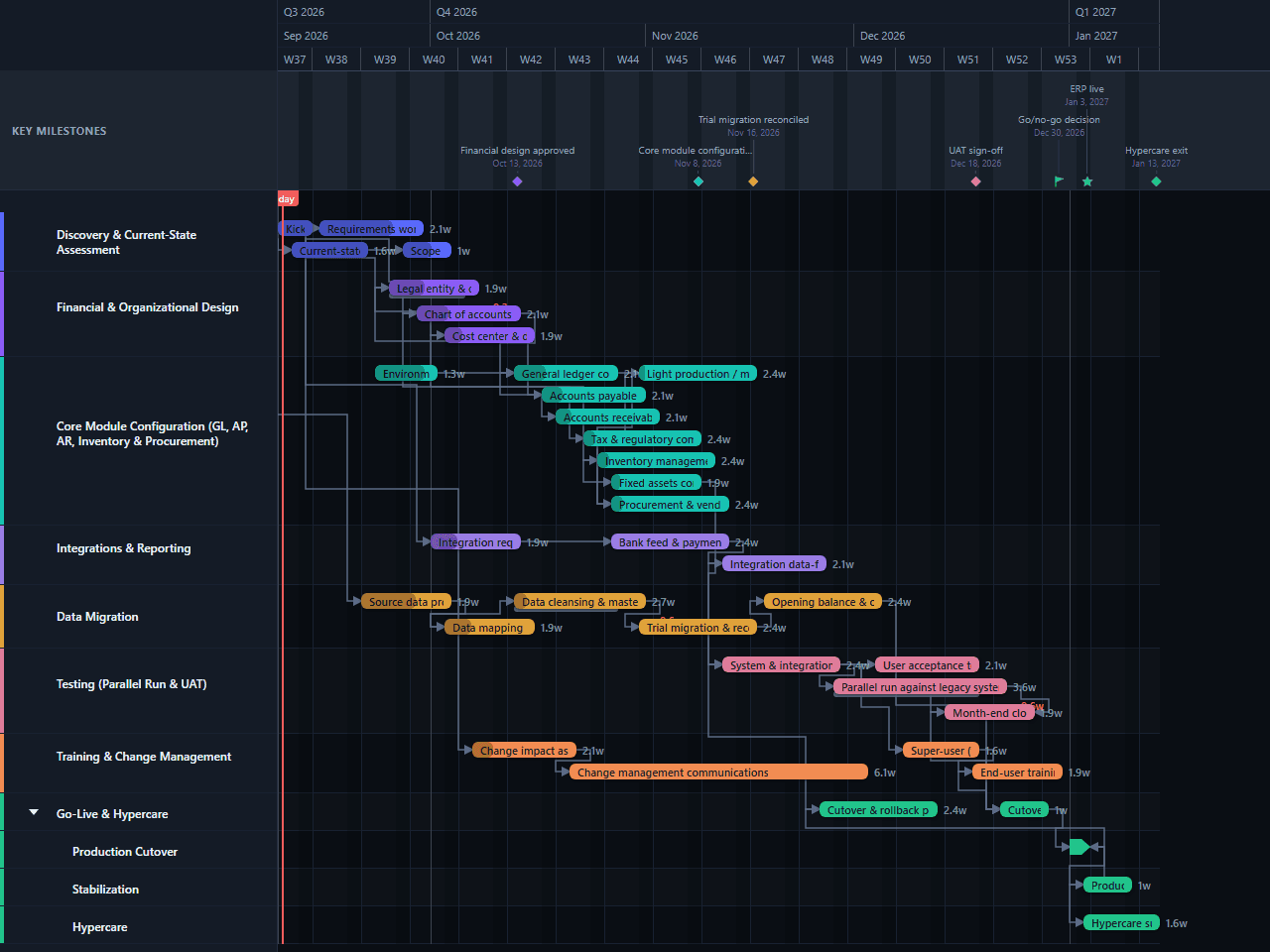
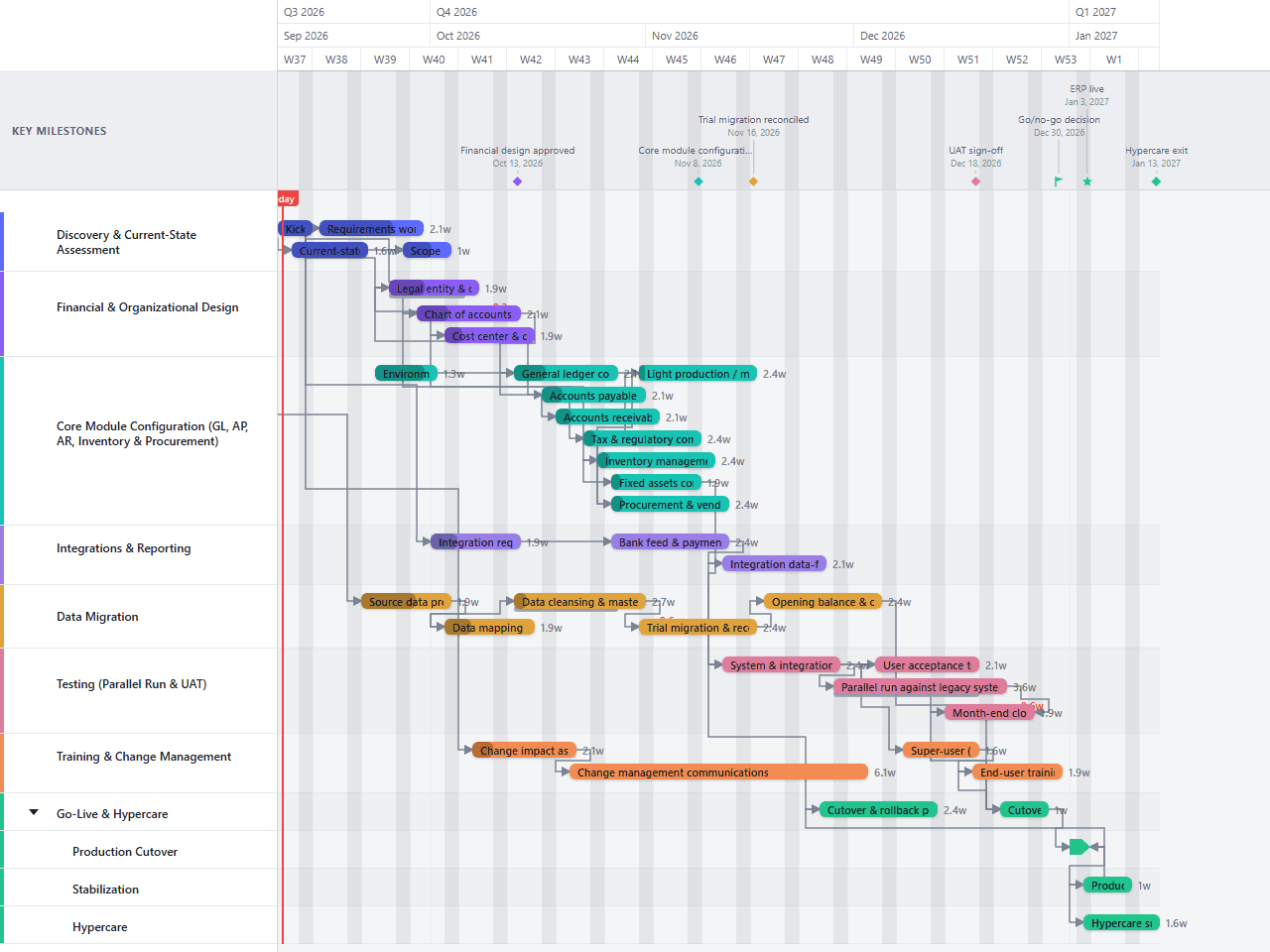
ERP Implementation Gantt Chart Template
An editable ERP implementation plan for the finance and operations side of a rollout: legal entity and chart-of-accounts design, GL/AP/AR/fixed-asset configuration, inventory and procurement setup, data migration of opening balances and open transactions, a parallel run against the legacy system, and a first month-end close before hypercare. A practical starting sequence for implementation leads, not vendor- or system-specific — illustrative phases and durations only.
- Discovery & Current-State Assessment
- Financial & Organizational Design
- Core Module Configuration (GL, AP, AR, Inventory & Procurement)
- Integrations & Reporting
- Data Migration
- Testing (Parallel Run & UAT)
- Training & Change Management
- Go-Live & Hypercare
Download the plan free as a CSV: phases, tasks, dates, and dependencies, ready to open in Excel, Google Sheets, or Numbers. Open it in GanttFlow instead and it drops in as a fully editable, presentation-ready Gantt chart (Pro).
An ERP implementation lives or dies on sequencing: the chart of accounts has to be settled before core modules can be configured against it, and finance teams rarely trust a new system until it has run in parallel with the old one and closed a period cleanly. This editable template lays those activities out as an illustrative 18-week schedule so the dependencies and handoffs are visible from the start.
Who this ERP implementation template is for
This template is for an implementation lead, finance systems consultant, or controller's-office project manager planning an ERP rollout's finance and operations side. It is written at the level of chart of accounts, legal entity structure, and core module configuration that applies broadly across ERP systems, rather than being tied to one platform's terminology.
It assumes legal entity and chart-of-accounts design, GL/AP/AR and fixed-asset configuration, inventory and procurement setup, one source-data migration of opening balances and open transactions, a parallel run against the legacy system, structured testing through a first close simulation, change management, and a short hypercare period. The durations are illustrative estimates, not commitments from a software vendor or implementation partner.
What is included in the 18-week ERP plan?
Eight primary workstreams cover the work from kickoff to operational handoff. The final workstream separates production cutover, stabilization, and hypercare into child lanes so concurrent launch work remains readable.
Discovery & Current-State Assessment includes governance setup and current-state financial process review, running alongside each other from the opening week.
Financial & Organizational Design covers legal entity and organizational structure design, chart of accounts design, and cost center and dimension structure: the foundation every downstream module configures against.
Core Module Configuration provisions the environments, then configures the general ledger, accounts receivable, and procurement and vendor setup, placeholders for the full GL, AP, AR, inventory, and procurement scope the lane name covers.
Integrations & Reporting covers integration requirements for banking, tax, and legacy systems, bank feed and payment integration, and integration data-flow validation.
Data Migration runs from source profiling and mapping through cleansing and master data governance, a reconciled trial migration, and opening balance and open-transaction migration.
Testing (Parallel Run & UAT) covers a parallel run against the legacy system, user acceptance testing, and a month-end close simulation that finishes on the same day the parallel run does.
Training & Change Management starts with change impact assessment, continues through communications, and finishes with super-user and end-user training near go-live.
Go-Live & Hypercare shows the cutover and rollback plan, dress rehearsal, production migration and cutover, production validation, and hypercare running through the first live close.
How the workstreams overlap
The schedule begins with kickoff on day one, with current-state review starting alongside it two days later. Source-data profiling begins two weeks in, early enough to expose migration risk before the financial design is too far along to change.
Legal entity and chart-of-accounts work starts once current-state review closes, and core module configuration (general ledger, accounts receivable, and procurement) starts as soon as environment provisioning and the chart of accounts are far enough along, rather than waiting for every design decision to be perfect. Integration work follows the same pattern: requirements begin during module configuration, and bank integration begins once those requirements close.
Testing runs through the second half of the plan. The parallel run against the legacy system overlaps user acceptance testing rather than waiting for it to close, and it's linked finish-to-finish to the month-end close simulation so the two are drawn to complete together; the close simulation only means something once the parallel run itself has produced real numbers to reconcile against. Training and cutover readiness also overlap that window, which keeps the schedule to 18 weeks without pretending that a parallel run, a close simulation, and cutover planning can happen in a final-week rush.
The final chain is intentionally firm: the cutover dress rehearsal feeds production migration and cutover directly, and cutover in turn feeds both production validation and the start of hypercare, so stabilization and the first live close can begin the moment the system goes live, not once someone remembers to schedule them.
How to adapt the template
Replace the illustrative dates
Set kickoff to the real start date, then replace each duration with an estimate from the person or team doing the work. Keep the 18-week version as a reference only if its assumptions fit your scope.
Confirm the modules and legal entities in scope
Rename or add module configuration tasks: this template ships with general ledger, accounts receivable, and procurement as placeholders for the full GL/AP/AR/inventory scope, and add one design task per legal entity if the rollout covers more than one.
Settle the chart of accounts before configuring modules
Treat chart-of-accounts and legal-entity sign-off as a hard gate. Changing it after GL, AP, or AR configuration has started usually means reconfiguring dependent modules, not just updating a lookup table.
Size the parallel run to your close cycle
A parallel run needs to cover at least one full close to be convincing. If your close cycle is longer than what this template shows, lengthen the parallel-run and close-simulation bars before accepting the go-live date.
Baseline after financial design approval
Once the chart of accounts, legal entity structure, and migration assumptions are agreed, save the baseline. Review any variance at the weekly project meeting and move the go-live milestone only through the agreed change process.
Limitations of this example
This is a schedule template, not a complete implementation method. It does not calculate team capacity, licensing costs, hosting or infrastructure procurement, budget, vendor availability, or the impact of a multi-entity or multi-country rollout. It also does not replace a RAID log, detailed test scripts, a data reconciliation workbook, or a cutover runbook.
The 18-week duration is illustrative. A single-entity rollout with clean data and limited customization may finish sooner. Multiple legal entities, extensive customization, regulated reporting, several integrations, or a phased deployment can extend the work considerably. Add lanes or rollout waves where those constraints are real rather than compressing them into the existing bars.
Start with the editable ERP implementation chart
Download the plan above free as a CSV, no account needed. Open it in GanttFlow Pro instead for the live, editable version with baselines and non-sequential dependency types, so the parallel-run and close-simulation gates stay visible as the real dates move.
Questions about this template
- How long does an ERP implementation take?
- This template uses an illustrative 18-week schedule from kickoff through hypercare exit, including a first month-end close. Actual duration depends on the modules in scope, the number of legal entities, integration complexity, source-data quality, and regulatory requirements. Treat the dates as a planning baseline and replace them with estimates from your delivery team.
- Why does this template include a parallel run?
- Finance teams typically need to see the new system produce results that reconcile against the legacy system before they'll trust it with real transactions. The parallel run lane overlaps user acceptance testing and is linked finish-to-finish to the first month-end close simulation, so the close only counts once the parallel run has real numbers behind it.
- Is this template specific to one ERP system?
- No. It is written at the level of chart of accounts, legal entity structure, general ledger, accounts payable and receivable, inventory, and procurement that applies across ERP systems. Rename tasks to match your platform's terminology once scope is confirmed.
- Why does chart of accounts design happen before module configuration?
- General ledger, cost center, and reporting configuration all depend on the chart of accounts and legal entity structure being settled first. Changing it after configuration starts usually means reconfiguring dependent modules, not just updating a lookup table.
- What does this ERP template leave out?
- It does not estimate licensing costs, hosting or infrastructure procurement, budget, staffing capacity, or a detailed risk and issue register. Add those controls in the systems your team already uses, then reflect any resulting date constraints here.