
Gantt Chart Dependencies Explained: FS, SS, FF, SF
The four ways two tasks can depend on each other, and when to use each one.
Why dependencies are worth drawing at all
A Gantt chart without dependencies is a picture of dates. A Gantt chart with dependencies shows how the work fits together. An ordinary drag still moves only the selected task. Hold Shift while dragging when the same date offset should move every task and linked milestone downstream.
That is the practical argument for spending ten minutes drawing arrows: it turns the chart from something you have to manually rewrite after every change into something you can shift as one connected chain.
Four ways two tasks can depend on each other
Most dependencies are Finish-to-Start: one task can't begin until the one before it ends. That covers a lot of real work, but not all of it. GanttFlow supports all four standard types.

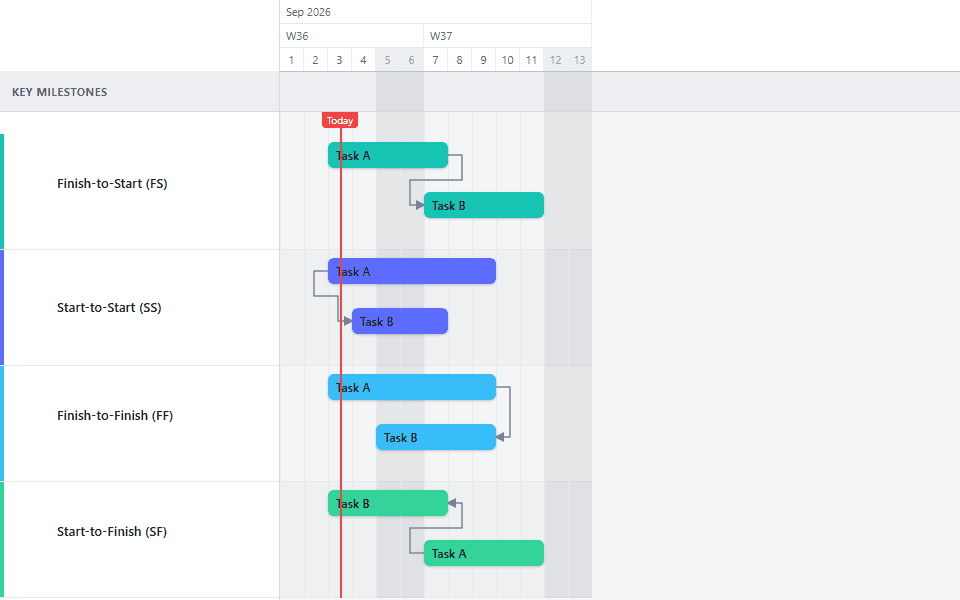
Finish-to-Start (FS). The second task starts when the first one finishes. This is the default, and it's the only type available on the Free plan.
Start-to-Start (SS). The second task starts when the first one starts. Useful for work that runs in parallel from the same kickoff point, like testing that begins alongside development rather than after it.
Finish-to-Finish (FF). The second task finishes when the first one finishes. Useful when two workstreams need to land together, even if they started at different times.
Start-to-Finish (SF). The second task finishes when the first one starts. This one is rare in practice: it fits situations like a handoff shift, where the outgoing task ends exactly when the incoming one begins.
When to use each type
The type you pick is a claim about the work, so it is worth being deliberate.
Reach for Finish-to-Start when the second task physically cannot begin until the first is complete. Concrete has to cure before steel goes up. A spec has to be signed off before it can be built against. If you are unsure, FS is the safe default: it is the most conservative reading, and a plan built entirely from FS links is pessimistic rather than wrong.
Reach for Start-to-Start when two pieces of work share a trigger but not a finish. This is the single most useful non-default type, because it is how most real parallelism gets modelled. A backend rewrite that begins when scope-locking begins. A native app build that starts once the web build is underway. Rough-in that begins while the envelope is still going up. Every one of these is a case where an FS link would add weeks to the plan that the team does not intend to spend.
Reach for Finish-to-Finish when two things must land together but started separately. Documentation finishing with the feature it documents. A training programme finishing when a system goes live. FF is about a shared deadline rather than a shared start.
Reach for Start-to-Finish almost never. It is included for completeness and it genuinely fits shift handovers and some just-in-time supply arrangements, but if you find yourself reaching for it on a normal project plan, it is worth checking whether you actually want an FF link drawn the other way round.
Select the dependency arrow
Click the arrow connecting two tasks. The settings panel shows a Dependency type field for that connection.
Choose a dependency type
Pick FS, SS, FF, or SF from the dropdown.
What dependency links do when dates move
A dependency link communicates an intended relationship; it does not act as an automatic scheduling constraint. The link type controls which edges the arrow connects. A normal drag moves only the task you selected. A Shift-drag moves all downstream tasks and linked milestones by the same day offset, regardless of whether their links are FS, SS, FF, or SF.
This is worth testing on your own chart before you rely on it. Hold Shift and drag a predecessor a week later, then watch which downstream bars and milestones follow. If something moves that should stay fixed, remove the link that makes it reachable. If something stays put that should move, the forward chain is missing a link.
The rescheduling guide covers normal drag and Shift-drag in more detail, including what happens when a shift reaches several links at once.
What GanttFlow does not model
Worth being explicit, because most scheduling tools handle these and their absence changes how you build a plan:
There is no lag or lead on a dependency. You cannot say "start three days after this finishes." A dependency here is a direct relationship between two dates with no offset. When you need a gap (a curing period, a review window, a shipping delay), model it as its own task with its own bar. This is arguably better practice anyway: a named "concrete cure" bar is visible and questionable in a way that a hidden three-day lag value is not.
There is no automatic critical path calculation. GanttFlow does not identify a critical path, compute float, or decide which linked chain controls the finish date. Use your schedule logic to identify the controlling work; the chart will display the links you add.
There is no dependency constraint enforcement. An arrow records and displays a relationship, but it does not stop you from placing dates that contradict it. Shift-drag preserves the current spacing by moving every downstream item by the same offset.
There is no resource levelling. Two tasks can overlap freely even if the same person is on both. The chart models sequence, not capacity.
Common mistakes with dependencies
Linking everything. A chart where every task connects to every other becomes a web of arrows nobody can read, and it makes the plan brittle: one slip visually cascades into everything. Link the relationships that are genuinely binding and leave the rest.
Using FS to mean "and then we do this." Sequence in your head is not the same as a constraint. If the second task could start earlier given the will and the people, an FS link is a scheduling decision disguised as a physical fact.
Modelling team contention as a dependency. When two tasks are sequential only because the same person does both, an arrow will produce a plan that looks constrained by the work when it is actually constrained by headcount. That is a resourcing conversation, and hiding it inside a dependency arrow prevents it from happening.
Forgetting to link milestones. Milestones can be dependency endpoints. A linked go-live marker is included when a Shift-drag reaches it; an unlinked marker stays put. Keep fixed external dates unlinked and connect milestones that should move with the work.
Never testing the cascade. Draw the links, then hold Shift and drag something. Five seconds of testing confirms which downstream items are reachable before you rely on the move.
A quick way to sanity-check your links
Once the chart is drawn, pick the last milestone and trace backwards through the arrows to the start. This is a useful review of the chain, but GanttFlow does not determine whether it is the critical path. If the trace breaks where the work clearly depends on something, you have found a missing dependency. If the trace loops, you have a circular reference that needs breaking.
Then hold Shift and drag the first task a week later. If the final linked milestone moves a week, the forward chain is connected. If it stays put, inspect the outgoing links before you present.
See these relationships in the construction schedule template and migration roadmap template. Both are illustrative schedules; replace their dates and links with the constraints that apply to your project.
Common questions
- What is the most common dependency type in project management?
- Finish-to-Start, by a wide margin. It covers any case where one task genuinely cannot begin until another is complete, which is the majority of real constraints. It is also the safest default: a plan built entirely from Finish-to-Start links is conservative rather than wrong, because it assumes no overlap anywhere.
- Does GanttFlow support lag or lead time on dependencies?
- No. A dependency links two dates directly with no offset, so you cannot express a rule like starting three days after something finishes. Model the gap as its own task instead - a named bar for a curing period, a review window, or a shipping delay. That is arguably better practice, since a visible bar can be questioned and a hidden lag value cannot.
- Can a milestone be part of a dependency chain?
- Yes. Link the last task in a chain to the milestone it produces, then use Shift-drag when the milestone should move by the same offset as the downstream work. A normal drag moves only the selected task. Leave a genuinely fixed external date unlinked so it stays put.
- How do I avoid a chart full of dependency arrows?
- Only draw links that are binding. If the second task could start earlier given the will and the people, the relationship is a scheduling preference rather than a constraint, and drawing it makes the plan look more rigid than it is. Sequence that exists only because the same person does both tasks is a resourcing issue, not a dependency.
- Why did my task not move when I dragged the one before it?
- A normal drag moves only the selected task. Hold Shift while dragging to shift every task and linked milestone downstream by the same number of days. If an item still stays put, check that it is reachable through outgoing dependency links. GanttFlow does not enforce the timing rule represented by each link type.