
How to Add Milestones to a Project Timeline
Mark the dates that matter: kickoffs, sign-offs, and go-live, as their own markers rather than tasks.
Mark the dates that matter
Some things on a plan are not work, they are moments. A contract signing, a go-live, a steering committee review. Those are milestones, and giving them their own marker keeps them from getting lost among the task bars.
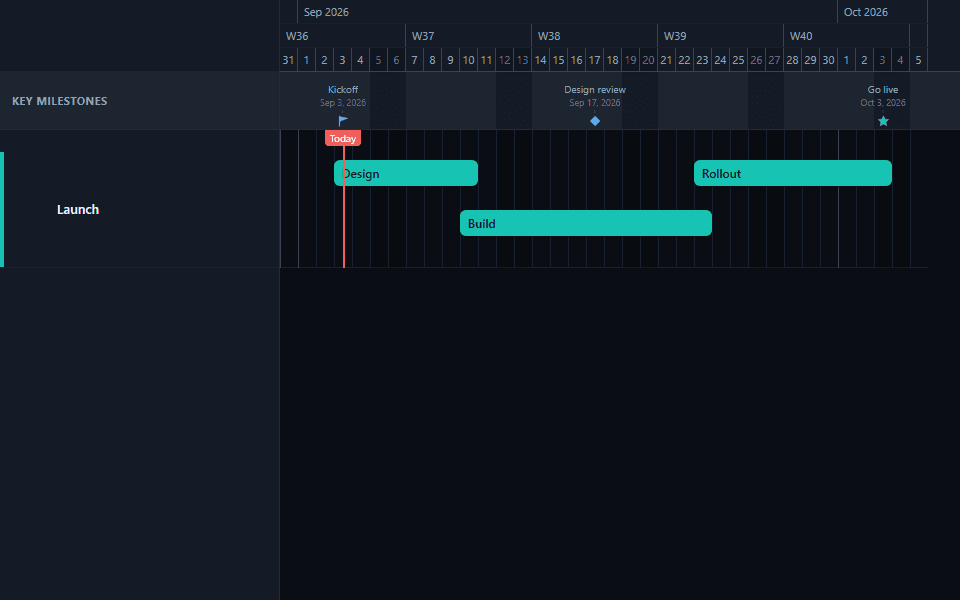
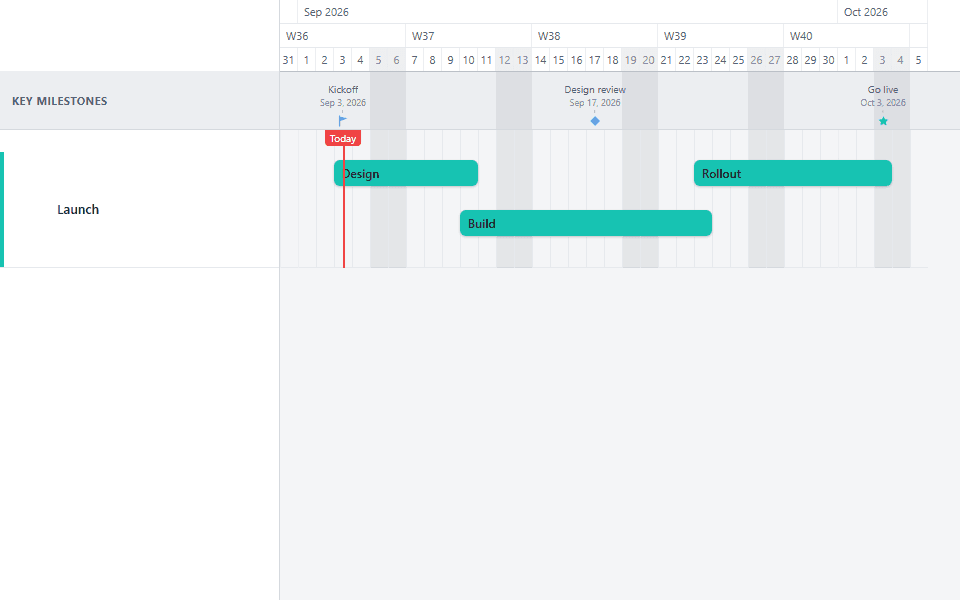
Add a milestone
A milestone marks a single point in time, so it takes a date rather than a start and an end.
Pick a marker shape
Six shapes are available besides the default diamond: star, flag, circle, square, triangle-up, and triangle-down. Set one shape as the chart's default, then override it on any individual milestone that deserves to stand out.
Choose where it shows
A milestone can sit in the ribbon above the chart, inline on a lane, or both. The ribbon works well for dates the whole project shares. Inline placement works better when a milestone belongs to one workstream.
What should be a milestone, and what should not
The most common mistake is having too many. A chart with a milestone on every deliverable has, in effect, no milestones: the markers stop drawing the eye because there is nowhere for the eye to go.
A useful test: a milestone is something someone outside the project team would notice, or something after which the rules change. Go-live is a milestone because users are affected. Code freeze is a milestone because the rules about what can be merged change. "Backend module complete" is usually neither; it is a task finishing, and the task bar already shows that.
Three to five milestones across a quarter is a good target. Across a two-year portfolio, three or four governance checkpoints is plenty. If you have more than one milestone per month on a long plan, they are probably task completions wearing a diamond.
Things that genuinely earn a marker:
- Approval gates: budget approved, scope locked, creative locked. Dates after which change costs money.
- External commitments: a launch, a handover, a contractual completion date, a compliance deadline.
- Governance points: steering committee reviews, phase gates, go/no-go decisions.
- State changes: code freeze, weathertight, data validated. The project is materially different on either side.
Things that usually should not:
- Individual task completions that already have a bar.
- Internal team checkpoints nobody outside the team tracks.
- Anything with a duration. If it takes three days, it is a short task, not a milestone.
Using shapes and placement deliberately
The six shapes exist so you can encode a second dimension of meaning without adding a legend.
A common and effective convention is to use one shape for commitments and another for checkpoints: diamonds for the dates you have promised externally, circles or squares for internal reviews. A reader picks up the distinction in a second without being told.
Another is to use flags for anything customer-visible and diamonds for everything else, which suits launch and campaign plans particularly well.
Whatever you choose, be consistent within a chart and do not use more than two or three shapes. Six different markers on one timeline is decoration, not information.
Placement follows a similar logic. Ribbon milestones sit above the chart and read as project-wide: the go-live everyone is working toward. Inline milestones sit on a lane and read as belonging to that workstream: the phase completion that matters to the platform team. Putting a genuinely project-wide date inline on one lane understates it; putting a team's internal checkpoint in the ribbon overstates it.
Milestones as dependency endpoints
Milestones can also be dependency endpoints. Hold Shift while dragging an earlier task and a linked go-live marker moves by the same offset. A normal drag moves only the selected task. See rescheduling without breaking dependencies for the exact behavior.
This is worth doing deliberately rather than leaving to chance, because an unlinked milestone is a date that will happily sit still while the work that produces it slides past it. A chart showing a launch marker on the fifteenth and the final build task finishing on the twentieth is not flagging a problem; it is just wrong, and it will be believed until someone notices.
Link the last task in a chain to the milestone that depends on it, then Shift-drag the first task in that chain a week later and confirm the milestone follows. If it does not, the forward chain is missing a link.
The exception is a genuinely fixed external date: a conference, a regulatory deadline, a contracted handover. Those should not move when your work slips, because they will not move in reality. Leave them unlinked, and let the gap between the marker and the work in front of it be the warning it deserves to be.
Common mistakes with milestones
Too many. The most frequent problem by a wide margin. Cut until only the dates you would defend in a meeting remain.
Milestones with duration. If it needs a start and an end, it is a task. Approval waits are tasks; the approval decision is the milestone.
No owner. Every milestone should be a date a specific person will be asked about. If nobody owns it, it is not tracking anything.
Unlinked milestones on a linked chart. They stay put while everything around them moves, which is worse than not having them, because the chart now asserts something false.
Fixed external dates modelled as dependent. The reverse error. A regulatory deadline that politely moves when your build slips is a chart telling you what you want to hear.
A quick review before you present
Look at the milestone markers alone and ask whether they tell the story of the project. If someone read only those dates and their labels, would they understand what this project is and when the important things happen? If yes, the milestones are doing their job. If it reads as a list of internal task completions, there is cutting to do.
Naming milestones so they survive being read alone
Milestone labels are the most-quoted text on any chart. They get copied into status emails, read aloud in meetings, and pasted into slides without the surrounding context, so they have to make sense on their own.
Name the state, not the activity. "Weathertight" is better than "finish envelope work", because it describes the condition the project is in rather than the task that produced it. A reader who knows nothing about the plan can still tell what is true on that date.
Avoid internal shorthand. A milestone called "P2 gate" means something to four people and nothing to the executive reading the export. If the phase has a real name, use it.
Make it verifiable. "Data validated" can be confirmed or denied. "Migration on track" cannot, and a milestone nobody can falsify is not a checkpoint. This is the same discipline that makes a phase-completion milestone useful in a funding conversation: someone can hold you to it.
Keep it short enough to fit. Long labels crowd each other in the ribbon, particularly at wider zoom levels, and get truncated in exports. Three or four words is usually the ceiling.
Applied together, these turn milestone labels into a summary of the project that happens to sit on a timeline, which is why the review above works at all.
See milestone patterns in the product launch template and marketing campaign template. Their dates are illustrative; replace them with the commitments that matter to your project.
Common questions
- How many milestones should a project timeline have?
- Three to five across a quarter, and only three or four governance checkpoints across a multi-year portfolio. If you have more than roughly one per month on a long plan, they are probably task completions wearing a diamond. A chart with a milestone on every deliverable effectively has none, because the markers stop drawing the eye.
- What is the difference between a milestone and a task?
- Duration. A task takes time and gets a bar; a milestone is an instant and gets a marker. If something needs a start and an end, it is a short task rather than a milestone. An approval wait is a task, and the approval decision at the end of it is the milestone.
- Should a milestone move when the work leading into it slips?
- Link it as a dependency endpoint, then hold Shift while dragging an earlier task when the milestone should move by the same offset. A normal drag moves only the selected task. Leave a genuinely fixed external date, such as a conference or regulatory deadline, unlinked so it stays put.
- Where should a milestone appear, in the ribbon or on a lane?
- In the ribbon if it is project-wide, such as a go-live everyone is working toward. Inline on a lane if it belongs to one workstream, such as a phase completion that matters to a single team. Putting a project-wide date inline understates it, and putting a team checkpoint in the ribbon overstates it.
- Do I need a paid plan to use milestones?
- No. Milestones, all six marker shapes, and both ribbon and inline placement work on the free plan. What the free plan limits is the number of projects and the dependency types available, not milestones themselves.