
Executive Roadmap Gantt Chart Template
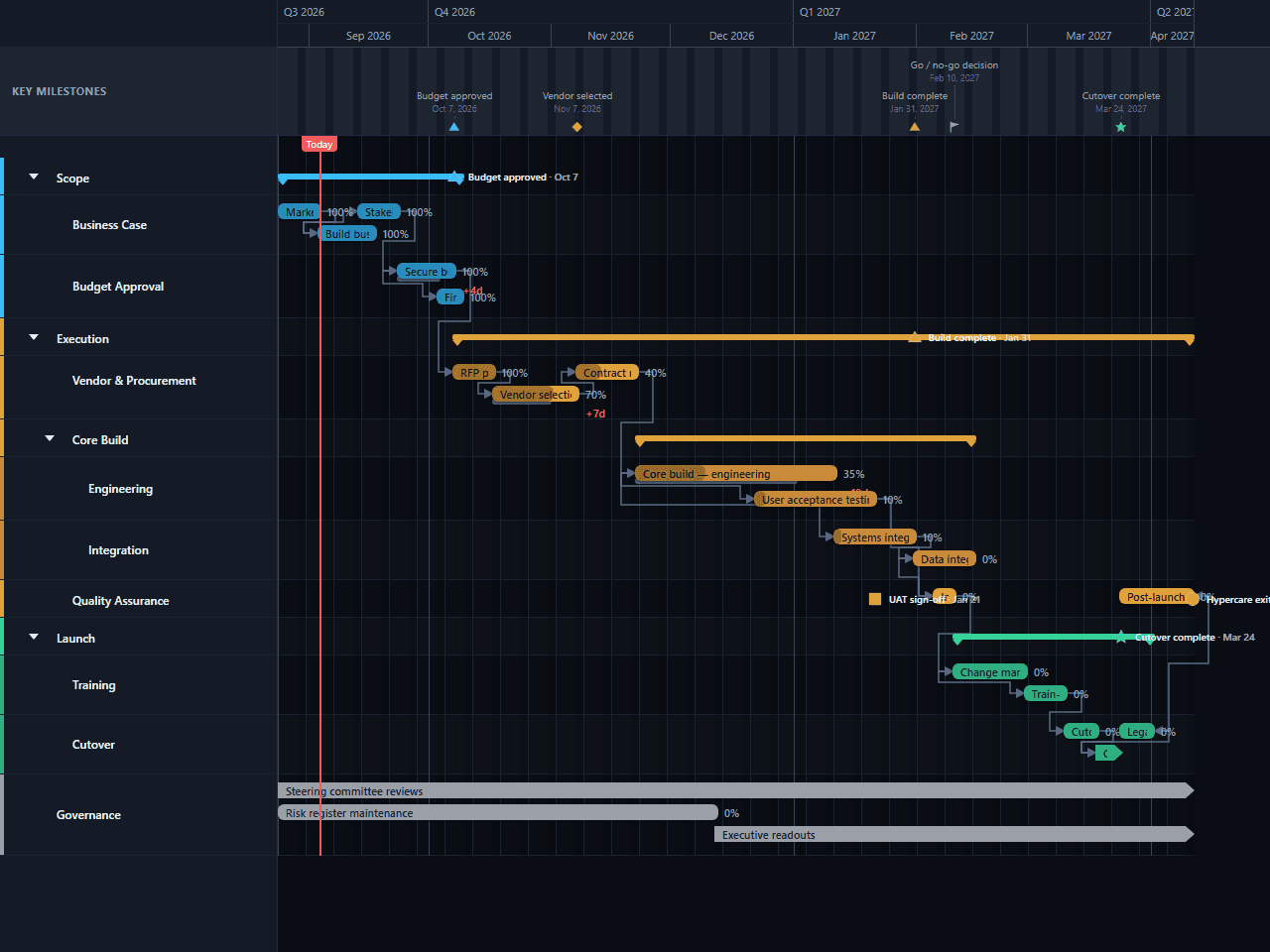
A leadership-ready roadmap that rolls detailed vendor, engineering, integration, and QA work up into summary group bars, moving from the business case through a three-deep execution phase to cutover. A standing Governance track runs the full length of the programme for steering reviews and the risk register, and a start-to-finish link keeps legacy decommissioning honest against when cutover actually begins. Built for presenting a high-level plan to executives without hiding the detail underneath it.
- Scope
- Execution
- Launch
- Governance
Download the plan free as a CSV: phases, tasks, dates, and dependencies, ready to open in Excel, Google Sheets, or Numbers. Open it in GanttFlow instead and it drops in as a fully editable, presentation-ready Gantt chart (Pro).
An executive roadmap is a document about money and commitment, drawn as a timeline. It's read in ten minutes by people who weren't in any of the working sessions, and it succeeds or fails on whether those people leave with the right facts. This template is built for that constraint: group rollups three lanes deep, a standing governance track, and a structure that follows the funding rather than the work.
Who this executive roadmap template is for
This is for a programme sponsor, a PMO lead, or a project manager reporting into a steering committee. It assumes an initiative with a business case, an approval gate, a delivery phase, and an organisational change at the end, the shape of most funded corporate projects, whether that's a system implementation, a vendor-delivered platform, or an internal transformation.
The audience is explicitly non-operational. They're deciding whether to keep funding this, not how to run it.
What are the phases of an executive roadmap?
Four top-level lanes, one nested three deep, plus a standing track alongside them.
Scope contains two sub-lanes. Business Case holds market sizing, the case itself, and stakeholder alignment. Budget Approval holds the wait for the decision. Separating them is one of the template's most important structural choices: it distinguishes work you control from time you don't.
Execution splits into Vendor & Procurement, Core Build (itself split into Engineering and Integration), and Quality Assurance. User acceptance testing begins about a week after the engineering build closes, once there's something stable enough to test.
Launch splits into Training and Cutover.
Governance stands apart from the phases entirely: steering committee reviews and executive readouts run the full length of the programme, with the risk register handed off partway through to the readouts.
Four milestones: budget approved, vendor selected, the go/no-go decision, and cutover complete.
How long does each phase take?
About seven months, weighted heavily toward execution.
Scope runs about six weeks: market sizing, the business case, and stakeholder alignment overlapping into just over two weeks waiting for budget approval. That approval bar is the one people delete, and it's the one that most reliably makes plans late.
Execution is the long middle at roughly nineteen weeks. Vendor selection and contracting take about four and a half weeks, and the engineering build runs about three and a half weeks. User acceptance testing begins about a week after the build closes, and systems integration runs alongside it before data integration testing carries the phase into January. The independent QA audit sits in a tight five-day window ahead of training.
Launch runs about six weeks: change management and training for about four weeks, then a two-week cutover sequence.
The proportion worth defending in front of a steering committee is that execution alone runs longer than Scope and Launch combined. Organisations routinely underweight it in the plan they show executives, front-loading the slide with scoping detail and compressing the build into a single bar, and it's the most reliable predictor of a steering pack that stops matching reality by month three.
Which dependencies matter here?
Ten links, deliberately few. Seven are finish-to-start and form the funding chain: market sizing finishes then the business case starts; stakeholder alignment finishes then budget approval starts; the RFP finishes then vendor selection starts; systems integration finishes then data integration testing starts; and the independent QA audit finishes before training starts. Nothing about this chain is negotiable: you cannot select a vendor with unapproved budget.
Three links are start-to-start. Two are worth naming: stakeholder alignment begins while the business case is still being written, and systems integration is keyed to when the engineering build starts rather than a date pinned to its finish, a deliberate choice, since tying integration to a fixed finish date is exactly what breaks when the build itself slips.
What to change for your own programme
Put the real approval date in first
Everything before it is estimate and everything after it is consequence. If the steering committee meets on a fixed cycle, the approval milestone lands on a meeting date, not a convenient one.
Delete anything an executive wouldn't act on
The template is already sparse at the top level thanks to the group rollups. Resist adding new top-level lanes; nest new detail under an existing one instead.
Make the progress numbers defensible
Replace the template's percentages with figures you could justify if challenged. An executive chart with invented progress is worse than one with none, because it will be quoted back to you.
Extend change management if the user base is large
About four weeks is a modest-deployment figure. For anything touching hundreds of users, this is the first bar to lengthen.
Baseline at budget approval
That's the moment the plan becomes a commitment. Every steering pack afterwards should show current against approved.
Common mistakes on executive roadmaps
Treating approval as instantaneous. It has duration, it's outside your control, and omitting it is why so many programmes are late before they start.
Flattening the rollups. The whole point of a three-deep structure under one visible bar is that the executive view stays short while the detail survives underneath. Show all nineteen tasks at once and the chart stops being an executive document.
Under-scheduling change management. The technical delivery is rarely what makes an implementation fail.
Optimistic progress. Executives remember numbers. A task that's been at seventy per cent for two months is a credibility problem that a chart with no percentages wouldn't have created.
Presenting the current plan with no history. Without a baseline the committee can't tell whether this is the third version of a slipping plan or a stable one, and they'll assume the former.
Getting it in front of the committee
Steering packs are circulated in advance, read on phones, and forwarded to people who weren't invited. Export a PDF for the pack and a PNG for the slide, and regenerate both before each meeting. No recipient needs an account, a login, or any familiarity with the tool, which is what keeps the chart in the pack rather than described second-hand in the minutes.
Questions about this template
- What should an executive roadmap show that a project plan does not?
- Less, rolled up. This template nests Execution three lanes deep: Core Build splits into Engineering and Integration, but every one of those rolls up to a single group bar an executive actually sees. The discipline isn't in hiding the detail; it's in never making an executive scroll to it.
- How much detail is too much for an executive audience?
- If a bar's own row wouldn't change a decision, it belongs under a group bar instead of beside one. This template's rollups exist so four summary bars (Scope, Execution, Core Build, and Launch) each carry a cluster of the nineteen-task programme underneath them, so an executive reads the shape of the plan without needing every row spelled out.
- Should progress percentages be shown to executives?
- Yes, provided they're real. This template ships with progress on every task that's realistically underway, because an executive reading a chart wants to know how far along things are without asking. The risk is fabricated precision: thirty-five per cent should mean something you could defend, not a visual guess.
- How do I show budget approval on a timeline?
- As a task with duration, followed by a milestone. Approval takes real elapsed time (this template gives it two weeks), and treating it as an instantaneous event is why plans routinely start late. The milestone marks the decision; the bar in front of it marks the waiting.
- Why does a standing Governance track run the entire length of the chart?
- Because steering reviews and risk management don't belong to any one phase; they run alongside all of them. Putting Governance in its own lane, rather than folding it into Scope or Execution, keeps it visible as a constant rather than implying it starts and stops with whichever phase happens to be active.
- Should I show risks on an executive roadmap?
- Not as bars. A Gantt chart shows sequence and duration, and forcing risk onto it produces a cluttered chart that communicates neither well. Keep risks in the written commentary beside the chart, and let the timeline carry only one risk signal: the gap between the baseline and where the bars sit today.